
EasyAim - Best Setup Rivals

If you’re playing hero shooters like Rivals, maximizing your aim assist isn’t optional—it’s essential. Precision and consistency are what separate average players from those consistently dominating high-kill matches.
In this guide, we’ll walk you through the optimal in-game settings and show you how to fully leverage EasyAim to unlock your true performance potential.
Step 1: Fine-Tune Your In-Game Settings
Start by aligning your in-game configuration with the recommended setup shown in our reference screenshots (excluding sensitivity).
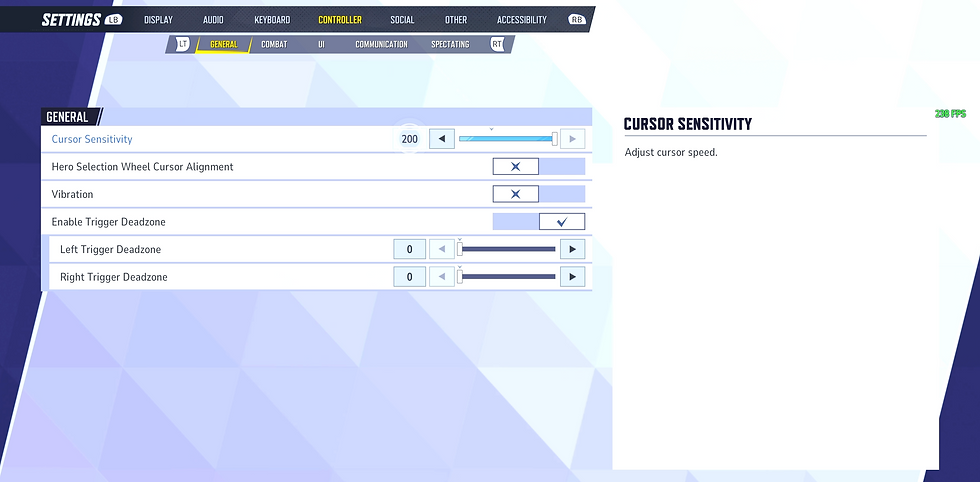


Sensitivity is highly personal. However, for competitive performance, it’s generally best to push this value as high as you can comfortably control. The goal is to find your personal upper limit—where speed and precision meet without sacrificing consistency.
Properly configured settings alone will already provide a noticeable improvement in your aim control and responsiveness.
Step 2: Unlock the Full Potential with EasyAim
While optimized in-game settings create a strong foundation, EasyAim is what elevates your gameplay to the next level.
To fully capitalize on aim assist mechanics, make sure to activate the recommended EasyAim configurations. These enhancements are designed to:
Improve target tracking consistency
Increase precision during high-pressure engagements
Maximize the effectiveness of built-in aim assist systems


For characters with higher recoil patterns, EasyAim also offers advanced anti-recoil options. While not always necessary, these can provide additional stability when handling more difficult weapon profiles.
Why EasyAim Rivals?
EasyAim Rivals isn’t just about assistance—it’s about control, consistency, and competitive advantage. By combining optimized in-game settings with EasyAim’s precision tools, you position yourself to consistently achieve higher kill games and outperform your competition.
If you’re serious about improving your performance, this setup isn’t just recommended—it’s essential
EasyAim works with all PCs and PlayStations (Remote Play required)
Comments